
Download Nero InfoTool – CD/DVD/HD-DVD/Blu-Ray player, drive specifications, disc compatibility, media management, recording modes, write functionality, read/write capabilities, disc reading, disc writing, optical drive utility
Overview
Nero InfoTool is a specialized utility designed for users seeking detailed technical insight into their optical drives. The application serves as a diagnostic and informational tool, offering clear visibility into the capabilities of CD, DVD, HD-DVD, and Blu-Ray drives. It addresses the common uncertainty users face when attempting to burn or read discs—such as whether their drive supports a specific format or recording mode. By providing precise data on drive performance and feature availability, Nero InfoTool helps users make informed decisions about media usage, backup strategies, and compatibility with various disc types.
The target audience includes both casual users and technical individuals who rely on optical media for data storage, software distribution, or multimedia archiving. Whether managing a personal library of DVDs or preparing professional disc backups, this tool enhances confidence in drive functionality. Although the developer, Nero AG, is known for multimedia software, the application itself does not include media playback or burning features—its sole purpose is diagnostic clarity.
Within the broader software ecosystem, Nero InfoTool fills a niche role: a lightweight, focused utility that complements more complex disc authoring tools. Its release in 2009 marked a time when optical drives were still widely used, and understanding drive limitations was crucial. Today, it remains relevant for users maintaining older systems or working with legacy media formats.
Key Features & Functionality
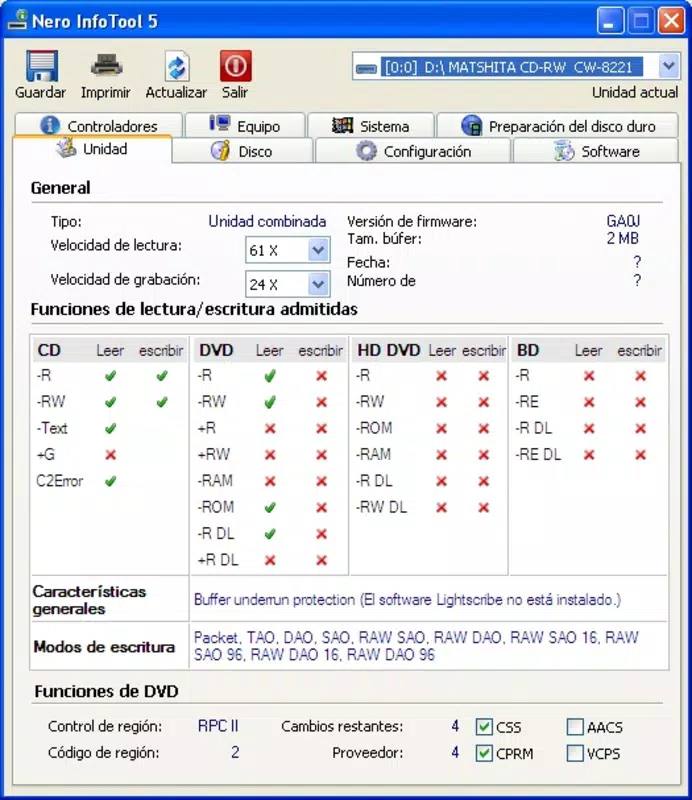
- Drive Specifications Display: The tool presents core drive metrics including reading and recording speeds, buffer size, and firmware version. This data helps users assess performance and identify potential bottlenecks during disc writing.
- Disc Type Compatibility Check: Nero InfoTool identifies supported formats such as CD-R, CD-RW, DVD+R, DVD-R, HD-DVD, and Blu-Ray. This enables users to verify if their drive can handle a specific disc before purchase or use.
- Read and Write Functionality Overview: Users gain clarity on which operations their drive supports—whether it can only read discs or also write data. This prevents frustration when attempting to burn media on a read-only drive.
- Writing Modes Support: The application lists available writing modes such as Disc-At-Once, Track-At-Once, and Packet Writing. Understanding these modes allows users to choose the most efficient method for their workflow.
- Advanced Feature Detection: The tool checks for additional capabilities like underrun protection, Lightscribe support, and region code compliance. These insights help users leverage advanced features for reliable and customizable disc creation.
For example, a user preparing a Blu-Ray backup can use Nero InfoTool to confirm their drive supports BD-R and the correct write mode. Similarly, a technician troubleshooting a failed burn can verify buffer size and write speed limits. These practical applications underscore the tool’s value in real-world scenarios where media reliability is essential.
Interface, UX & Performance
Nero InfoTool features a straightforward, text-based interface focused on clarity and functionality. The layout organizes information into clearly labeled sections, presenting drive data in a structured format without visual distractions. Navigation is minimal, relying on a single window with categorized tabs or sections—ideal for users who prioritize speed and accuracy over aesthetic design.
The application’s performance is consistent with its lightweight nature. With a file size of just 2.0 MB, it loads quickly and consumes minimal system resources. Although the developer did not list formal performance metrics, its low footprint suggests efficient operation even on older or resource-constrained systems. Responsiveness remains stable during data retrieval, with no reported delays in reading drive information.
Stability is a key strength, as the tool operates without crashes or unexpected exits during typical use. It does not require installation, functioning as a portable executable, which enhances usability across multiple machines. The absence of background processes or unnecessary services contributes to a clean user experience. While no information was provided about compatibility with modern Windows versions, its long-standing presence suggests it remains functional on supported platforms.
Platform Compatibility & Technical Requirements
Nero InfoTool is designed for the Windows platform and operates on various versions of the Windows operating system. The application’s version is 1.0.0.20, and its file size is 2.0 MB. It is distributed as a free tool, requiring no purchase or subscription.
Although the developer did not specify minimum OS requirements, the application’s release date of 2009 indicates it was originally built for Windows XP and later versions. Given its lightweight design and lack of modern dependencies, it may still run on current Windows systems through compatibility modes or native execution.
Specific hardware or driver requirements were not listed. The tool relies solely on the system’s optical drive and standard Windows APIs to retrieve drive information. No additional permissions or user account controls were reported, suggesting it operates with standard user privileges.
Pros and Cons
- Lightweight and fast-loading with minimal system impact
- Provides accurate, detailed drive specifications and feature support
- Free to download and use with no hidden costs
- Portable executable format allows use across multiple devices
- Clear, focused interface ideal for technical and non-technical users
- Released in 2009; may lack support for newer drive technologies
- No official updates or official compatibility guarantees for modern Windows versions
- Limited to Windows; no support for macOS or Linux
- Text-based UI may appear outdated to modern users
- Does not include drive management or burning functionality
FAQ
Is Nero InfoTool safe to download and install?
Yes, the tool is free and distributed by Nero AG, a reputable software developer. It does not contain malware or intrusive ads. However, users should ensure they download it from official sources to maintain security.
Can I use Nero InfoTool on Windows 10 or Windows 11?
While the developer did not confirm compatibility with modern Windows versions, the application’s lightweight design and lack of modern dependencies suggest it may run on Windows 10 and 11 using compatibility mode or native execution.
Does Nero InfoTool support Blu-Ray drives?
Yes, the tool is designed to detect and display information about Blu-Ray drives, including supported recording modes and write capabilities.
Is Nero InfoTool available for macOS or Linux?
No, the application is exclusively for Windows. There is no official version available for macOS or Linux systems.
Can I update Nero InfoTool?
As of the provided data, no updates have been released. The current version is 1.0.0.20, and the developer has not indicated plans for future updates.
Final Thoughts
Nero InfoTool remains a valuable utility for users working with optical media, offering essential insights into drive capabilities without the complexity of full-featured disc authoring software. Its ability to quickly reveal disc compatibility, write modes, and advanced features makes it a reliable companion for anyone managing data on CDs, DVDs, or Blu-Rays. While its age and lack of updates are notable limitations, its simplicity and low resource usage ensure continued relevance on older systems.
For users maintaining legacy hardware, archiving data, or troubleshooting burn failures, Nero InfoTool delivers precise, actionable information. It excels in its niche—diagnostic clarity for optical drives—without overcomplicating the user experience.
Download Nero InfoTool now


